

Extended Reality (XR)
Definition: Extended reality is the umbrella term for all technologies that connect or replace digital and physical reality. XR covers the full spectrum of immersive experiences, from fully virtual environments to digital overlays on the real world.
The XR spectrum has three main categories: - Virtual Reality (VR) – full immersion in virtual worlds - Mixed Reality (MR) – digital objects anchored in space in the real environment - Augmented Reality (AR) – digital overlays on the real world
For B2B companies in mechanical engineering, XR makes it possible to use 3D models of complex machines across different channels: from interactive web viewers and AR presentations at the customer site to immersive VR training and kiosk systems at trade shows.
English: Extended Reality German: Erweiterte Realität
Understanding the XR Spectrum
XR describes a continuum between fully real and fully virtual perception:
Physical reality The unchanged, real environment without digital elements.
Augmented Reality (AR) Digital content is placed over the real world. The physical environment stays visible and dominates the perception. Users see the real world through a camera or transparent displays, with added virtual elements such as 3D models, text or animations.
Mixed Reality (MR) An extended form of AR in which virtual objects are anchored in space in the real environment and interact with it. MR systems understand the geometry of the room. They can hide virtual objects behind real objects and place them on surfaces. The boundary between real and virtual is less clear than with simple AR.
Virtual Reality (VR) Full immersion in a computer-generated environment. The physical world is hidden, and users are completely in a virtual world. VR headsets replace the view of the real environment with stereoscopic displays.
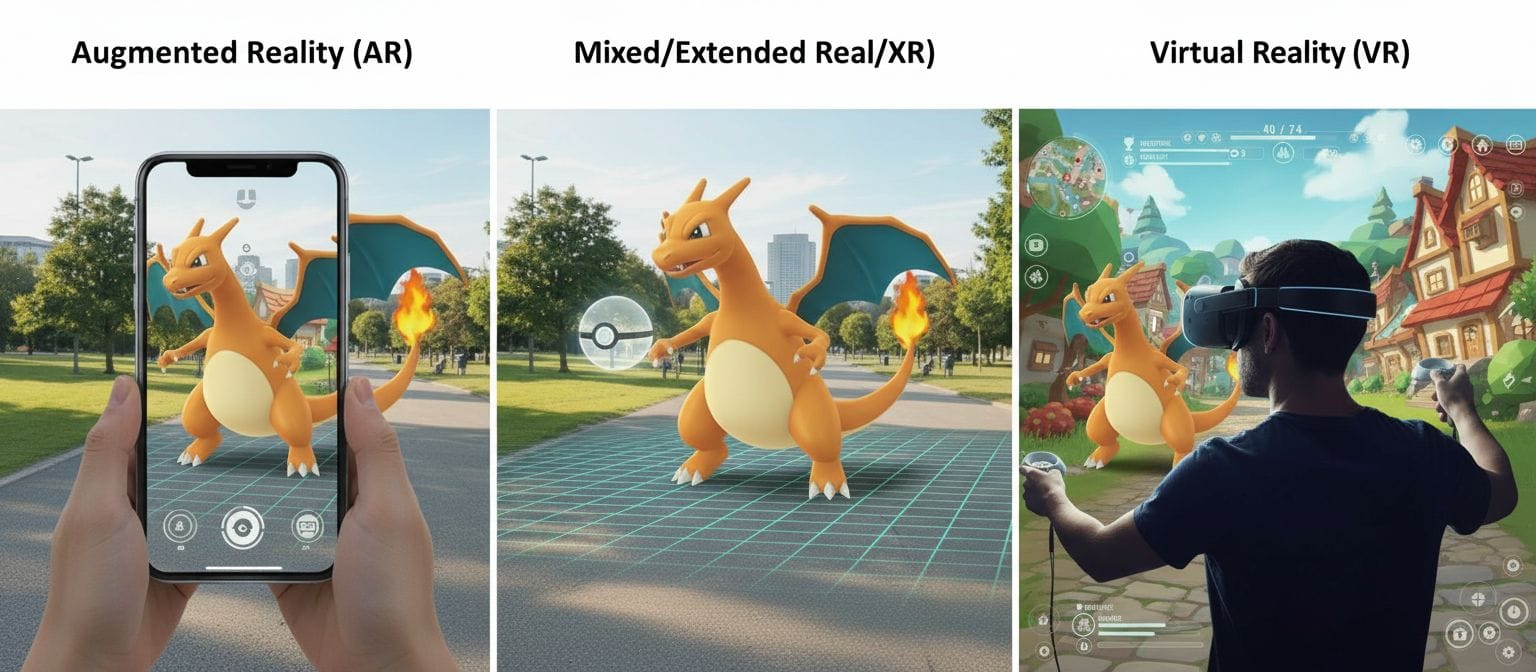
What makes XR special: it is not a choice between two options, but a spectrum. Modern platforms move flexibly along this spectrum and select the best form of presentation for each use case.
Virtual Reality (VR) in Detail
Virtual reality is the full immersion in computer-generated 3D environments with head-mounted displays (VR headsets).
Technology: - Closed VR headsets with stereoscopic displays (a separate image for each eye) - 6DoF tracking (six degrees of freedom) for head and hand movements - Controllers or hand tracking for interaction - Spatial audio for three-dimensional sound - 90-120 Hz refresh rate for smooth movements
When to use VR: - Training in a safe, repeatable environment - Virtual collaboration and remote meetings over long distances - Product presentations of large machines without logistics effort - Design reviews and prototype validation before production - Factory planning at a 1:1 scale
Advantages: - Full concentration without distraction from the real environment - Natural perception of the size of complex machines - Location-independent: no physical machine is necessary - Several people can be in the same virtual environment at the same time
Limitations: - Needs dedicated hardware (headsets) - Not suitable when the physical environment is relevant - Some users experience motion sickness - Setup effort for multi-user sessions
Augmented Reality (AR) in Detail
Augmented reality overlays the real world with digital content through smartphones, tablets or AR glasses.
Technology: - A camera captures the real environment - Markerless tracking or marker tracking for positioning - SLAM algorithms for spatial understanding - Real-time rendering of 3D objects in the correct perspective - Touch gestures, voice or hand tracking for interaction
When to use AR: - Product visualization at the planned installation site - Remote service with expert support - Maintenance instructions directly at the machine - Marketing and low-barrier product presentations - Quality control with target/actual comparison
Advantages: - The real context stays visible (space requirements, integration) - Accessible on smartphones (no additional hardware) - Hands-free use is possible with AR glasses for service technicians - WebAR works without app installation
Limitations: - Tracking stability depends on the environment (light, textures) - Limited visual immersion (the real world distracts) - Smartphone AR blocks one hand - AR glasses are expensive and have limited battery life
Mixed Reality (MR) in Detail
Mixed reality is an extended form of AR with a spatial understanding of the environment.
Technology: - AR glasses with depth sensors (for example Microsoft HoloLens, Magic Leap) - Spatial mapping creates a 3D mesh of the environment - Occlusion: real objects hide virtual objects - Surface detection: virtual objects are placed on real surfaces - Persistent anchoring: objects stay in position, also after a restart
When to use MR: - Design reviews at the real installation site - Spatial planning (machine layout, walkways) - Interactive training on real hardware with virtual overlays - Collaborative product development with physical prototypes
Advantages: - Natural interaction between virtual and real - Spatial understanding enables realistic placement - Hands-free work - Several users see the same content at the same location
Limitations: - Needs expensive, specialized hardware (2,000-3,500 euros) - Limited field of view of current devices - Spatial mapping of large rooms takes much effort - Not yet as common as smartphone AR or VR
XR Decision Tree: Which Technology When?
Question 1: Must the real environment stay visible? - Yes → AR or MR - No → VR
Question 2 (if AR/MR): Is spatial interaction between virtual and real important? - Yes (for example, place on a table, hide behind objects) → MR - No (a simple overlay is sufficient) → AR
Question 3 (if AR): Which hardware is available? - Only smartphones → smartphone AR (ARKit, ARCore) - No hardware (customer presentation) → WebAR in the browser - Budget for glasses + hands-free work necessary → AR glasses (RealWear, HoloLens)
Question 4 (if VR): Stationary or mobile? - Stationary (office, showroom) → PC VR for the highest quality - Mobile (trade show, customer meetings) → standalone VR (Meta Quest)
Best practice: Use a multi-platform approach. Prepare the same 3D models for all channels: web viewers for wide accessibility, AR for customer sites, VR for training, kiosks for trade shows.
XR in the Mechanical Engineering Industry
Challenges in mechanical engineering: Machines and plants are too large and heavy for physical presentations at all locations. International customers cannot always travel to showrooms or factories in person. Complex functions are difficult to explain. Service technicians need specialized knowledge. Training on running production plants is expensive and risky.
XR as a solution along the customer lifecycle:
Sales and customer acquisition: - VR showrooms for full immersion without a physical machine - AR visualization at the planned installation site at the customer - Web viewers for the first digital product exploration - Kiosk systems at trade shows with interactive presentations
Quotation and configuration phase: - Real-time configuration in VR or AR - Compare different options - Check space requirements and integration - Involve decision makers (location-independent)
Installation and commissioning: - AR instructions for assembly teams - Remote support for complex steps - Digital twin for preparation
Training: - VR training on a virtual machine before access to the real machine - AR overlays on the real machine for the first steps - Repeatable training without production downtime - Standardized training at all locations
Maintenance and service: - AR instructions directly at the machine - Remote experts see the camera image and mark components - Spare parts visualization before ordering - Predictive maintenance with a digital twin
ROI from XR: - 40-60% reduction in service travel costs - 25% higher first-time fix rates - 30% shorter sales cycles through better product understanding - 75% higher knowledge retention with VR training vs. classroom teaching
Overview of XR Hardware and Platforms
Virtual reality: - Standalone: Meta Quest 3 (€500), HTC Vive XR Elite (€1,200) - PC VR: Valve Index (€1,000), HTC Vive Pro 2 (€800) - Enterprise: Varjo XR-3 (€5,500), HP Reverb G2 (€600)
Mixed reality: - Microsoft HoloLens 2 (€3,500) – enterprise-focused, robust spatial mapping - Magic Leap 2 (€3,300) – high optical quality, medical approvals - Meta Quest 3 (€550) – hybrid VR/MR with color passthrough, consumer price
Augmented reality: - Smartphones: iPhone (ARKit), Android (ARCore) – already available - Tablets: iPad Pro with LiDAR – more precise tracking - Smart glasses: RealWear Navigator (€2,500) – ruggedized for industry - WebAR: browser-based – no hardware purchase necessary
Platform decision: For B2B, a step-by-step approach is recommended: 1. Start: WebAR and smartphone AR (lowest entry barrier) 2. Expansion: standalone VR for training and showrooms 3. Professional: AR glasses for service teams 4. Premium: MR glasses and enterprise VR for complex applications
Challenges in XR Implementations
Content creation: You must optimize 3D models from CAD for XR (polygon reduction, texture baking, LOD generation). After this preparation, they should work on all platforms. Modern pipelines automate most of this process.
Hardware fragmentation: Different devices have different capabilities. Cross-platform frameworks such as Unity with the XR Plugin Framework or WebXR standards help you avoid duplicate code. A realistic estimate: 70-80% code sharing is possible, 20-30% is platform-specific.
User acceptance: Not all employees are open to XR immediately. A step-by-step introduction is recommended: start with simple applications (web viewers), then AR on familiar devices (smartphones), later specialized hardware (glasses). Change management and training are essential.
Infrastructure: Large 3D models need bandwidth. In production environments, Wi-Fi can be limited. Hybrid approaches with offline models and cloud updates combine the best properties. Edge computing reduces latency.
Costs: Initial investments in content creation and hardware can be high. The ROI often shows only after 12-18 months. Pilot projects with measurable KPIs help to validate the business case. Start with one use case (for example service), then expand step by step.
Standards and interoperability: Prefer open standards (WebXR, OpenXR, glTF) to avoid vendor lock-in. Use proprietary solutions only when they give clear added value.
Frequently Asked Questions (FAQ)
What is the difference between XR, AR, VR and MR?
XR (extended reality) is the umbrella term for all immersive technologies. VR (virtual reality) completely replaces the real environment with virtual worlds. It is suitable for training and presentations. AR (augmented reality) places digital content over the real world. It is ideal for service and product visualization at the installation site. MR (mixed reality) is advanced AR with spatial understanding: virtual objects interact with the real environment. Modern platforms combine all three for flexible applications.
Which XR technology should my company start with?
Recommendation for B2B mechanical engineering: start with web-based 3D viewers and smartphone AR. They need no hardware investment, and customers already have the devices. Identify a specific use case with measurable ROI (for example, lower service costs or shorter sales cycles). Run a pilot project for 3-6 months. Measure the success, then expand to more platforms (VR for training, AR glasses for service). Important: use the same 3D models for all channels.
Can I use existing CAD data for XR?
Yes, you can convert CAD models from SOLIDWORKS, CATIA, Siemens NX or other systems. The process includes: 1) export as STEP, STL or native format, 2) polygon reduction (CAD often has millions of polygons, XR needs thousands), 3) texture optimization and material baking, 4) LOD generation for performance, 5) export as glTF or a platform-specific format. Modern tools automate this workflow. After conversion, the models work in web, AR, VR and kiosk applications.
How much does an XR implementation for one machine model cost?
Initial content creation: €2,000-8,000 per machine model (depends on the complexity, the availability of CAD data and the required quality). Platform setup: WebAR/web viewer €5,000-15,000, VR application €10,000-30,000, AR app €15,000-40,000. Hardware: smartphones are already available, VR headsets €500-3,500 per device, AR glasses €2,000-3,500 per device. Running costs: hosting, updates, support €500-2,000 per month. Lower service costs and shorter sales cycles often bring the ROI within 12-18 months.
Do XR applications work offline?
Yes, XR tracking (AR, VR) works completely locally without the internet. But you must download the 3D models and content first. Native apps support an offline mode with preinstalled models. This is important for service tasks without Wi-Fi. WebAR and web viewers need an initial internet connection, but they can partly work offline with progressive web app (PWA) technology. Best practice: a hybrid approach with base models available offline and updates when a Wi-Fi connection is available. Cloud streaming for very large models is optional, but it needs a connection.
Industry Standards and Technologies
OpenXR standard A cross-platform standard of the Khronos Group for AR/VR applications. You develop once and deploy on different headsets and platforms. Source: https://www.khronos.org/openxr/
W3C WebXR Device API A standard for browser-based AR/VR experiences without app installation. It enables cross-platform XR access through web browsers. Source: https://www.w3.org/TR/webxr/
glTF 2.0 format A Khronos standard for 3D assets on the web and in XR. Efficient transfer and display of complex scenes on all platforms. Source: https://www.khronos.org/gltf/
ARKit (Apple) Apple's AR framework for iOS with SLAM-based tracking, light estimation and plane detection. Source: https://developer.apple.com/augmented-reality/arkit/
ARCore (Google) Google's AR framework for Android with functions similar to ARKit and wide device support. Source: https://developers.google.com/ar
Unity XR Plugin Framework A development environment for cross-platform XR applications with integrated support for all major headsets. Source: https://unity.com/unity/features/xr
Related Topics
XR technologies: - Virtual Reality (VR) – full immersion in virtual worlds - Augmented Reality (AR) – digital overlays on the real world - Mixed Reality (MR) – virtual objects anchored in space - visionOS – Apple's spatial computing platform - Spatial computing – spatial data processing
AR tracking technologies: - Markerless tracking – AR without prepared markers - Marker tracking – AR with reference points - SLAM – simultaneous localization and mapping - Image tracking – AR activation through image recognition - Object tracking – 3D object recognition
3D technologies: - 3D model – digital 3D representation - CAD-to-3D conversion – workflow from design to XR - Real-time rendering – 3D display in real time - Level of detail (LOD) – performance optimization - Digital twin – virtual copies of real machines
Hardware: - Head-mounted display (HMD) – VR/MR headsets - Smart glasses – AR glasses for industrial applications - 6DoF tracking – motion capture with six degrees of freedom - Inside-out tracking – camera-based tracking - Spatial mapping – 3D capture of the environment
Application areas: - Product visualization – product presentation across all XR channels - Remote service – technical support with AR/VR - VR training – training in virtual environments - AR maintenance – maintenance with digital instructions - Virtual collaboration – collaboration in XR


