

Definition: Real-time rendering is the ability of a computer system to calculate and display 3D graphics immediately while users interact with them, typically at a minimum of 30-60 frames per second.
Offline rendering calculates single high-quality images or videos over hours or days. Real-time rendering is different: it must generate each image in milliseconds. This makes immediate responses to user input possible (camera rotation, zoom, configuration changes) without noticeable delays.
For B2B companies in mechanical engineering, real-time rendering means this: customers can explore products interactively, change options in real time and look at machines from all angles, on websites, in AR apps or in VR environments.
English: Real-time Rendering German: Echtzeit-Rendering
Basics of Real-Time Rendering
Frame-based display
Real-time rendering is frame-based: the GPU (graphics processing unit) continuously calculates single images (frames) and shows them on the screen. At 60 FPS (frames per second), the GPU has only ~16 milliseconds per frame. This includes all calculations: geometry transformation, lighting, textures, shadows and post-processing.
The rendering pipeline
Each frame goes through a standardized pipeline:
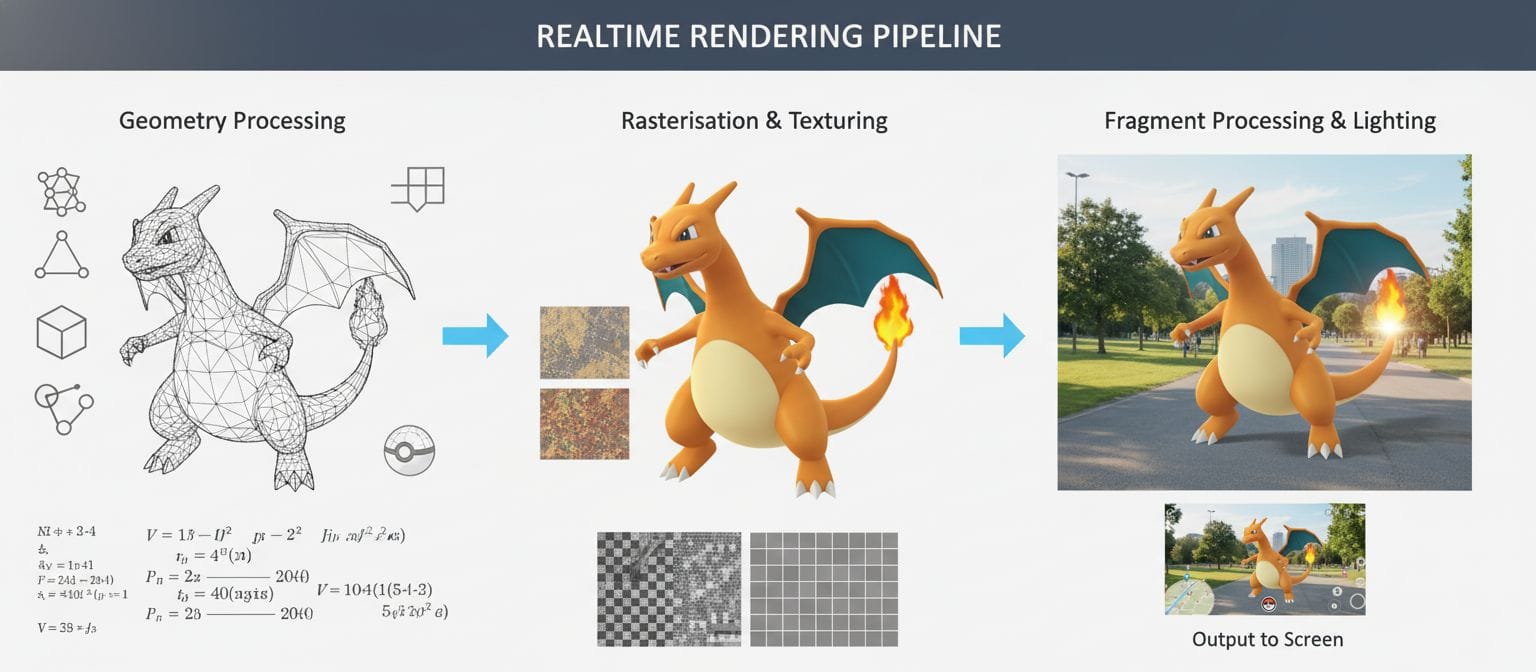
- Application stage: The CPU prepares the scene (which objects are visible, which transformations apply)
- Geometry processing: The GPU transforms 3D coordinates into screen coordinates
- Rasterization: Conversion of geometry into pixels
- Pixel/fragment processing: Calculation of color, lighting and textures for each pixel
- Output: The finished image goes to the screen
Optimizations try to save time in each stage without visible quality loss.
Why is real-time rendering difficult?
Physically correct lighting (as in offline rendering for films) needs extremely much computing power. Real-time rendering uses approximations and tricks to get similar results in a fraction of the time: - Precalculated shadow maps instead of ray tracing - Level of detail (LOD): fewer polygons for distant objects - Occlusion culling: objects that are not visible are not rendered - Texture baking: complex lighting is "baked" into textures
Rendering Techniques Compared
Rasterization (classic)
The standard technique for real-time rendering for decades. The geometry is split into triangles, and these are converted into pixels. Very fast, but with limits in lighting (direct lighting only, no correct reflections).
Advantages: - Extremely fast (millions of polygons per frame are possible) - Wide hardware support - Predictable performance
Disadvantages: - Difficult for realistic reflections and global illumination - Shadows need separate calculations (shadow maps)
Ray tracing (modern)
Simulates in a physically correct way how light rays travel through a scene. Gives perfect reflections, refractions and soft shadows. For a long time, it was practical only for offline rendering.
Real-time ray tracing is possible since ~2018 because of: - Specialized hardware (RTX cores in modern GPUs) - Hybrid approaches (rasterization for the base, ray tracing for effects) - Denoising algorithms (fewer rays necessary)
Advantages: - More photorealistic display - Correct reflections and global illumination - Fewer tricks and workarounds necessary
Disadvantages: - Requires modern, expensive hardware - Not yet available on all devices (smartphones, older PCs) - Performance overhead
For B2B product visualization: We recommend a hybrid approach: rasterization as the base (wide compatibility), optional ray tracing for a premium experience on high-end hardware.
Real-Time Rendering for B2B and Mechanical Engineering
Interactive product configurators
Customers select options (color, equipment, modules) and see the result immediately. Real-time rendering gives direct visual feedback without waiting times. The sales cycle becomes shorter, because customers understand the product better.
Web-based 3D viewers
Websites show machines in 3D. Visitors can rotate, zoom and start animations. Modern WebGL/WebGPU makes real-time rendering possible directly in the browser without plugins. Important: performance optimization for a wide range of devices (desktop, tablet, smartphone).
Virtual reality presentations
VR requires especially demanding real-time rendering: 90-120 FPS for smooth movement without motion sickness, stereoscopic rendering (two images at the same time), low latency (<20ms). VR applications show machines in life size and make virtual walkthroughs possible.
Augmented reality applications
AR on smartphones requires real-time rendering with additional challenges: show the camera feed, calculate tracking, embed virtual objects in the correct perspective. All of this happens in real time on mobile hardware. The performance budget is even tighter than on desktop.
Training
Interactive training scenarios with real-time rendering let you repeat any situation. Operators learn machine control in a safe environment. Real-time visualization gives immediate feedback on actions.
Virtual trade shows and showrooms
Digital booths show the full product portfolio in 3D. Visitors explore on their own, switch between models and configure live. Real-time rendering gives smooth navigation, also in complex scenes.
Performance Optimization for Complex Machines
Polygon reduction and LOD
CAD models often have millions of polygons. This is too much for real-time rendering. Optimization techniques:
- Polygon reduction: Reduction to 50,000-500,000 polygons, based on the target platform
- Level of detail (LOD): Several versions of the model with different complexity. Distant objects use lower LODs
- Impostors: Images replace very distant objects
Texture optimization
High-resolution textures (4K, 8K from CAD) are too large for real-time rendering:
- Texture compression: Smaller file size without visible quality loss
- Mipmaps: Precalculated smaller textures for distant objects
- Texture atlases: Combine several textures in one file (fewer draw calls)
Material baking
Complex materials and lighting are "baked" into textures:
- Normal maps: Simulate details without additional polygons
- Ambient occlusion: Precalculated shadows in recesses
- Lightmaps: Precalculated static lighting
Culling techniques
Render only visible objects:
- Frustum culling: Ignore objects outside the camera field of view
- Occlusion culling: Do not render parts that other objects hide
- Distance culling: Hide very distant objects
Web-Based vs. Native Rendering
Web-based (WebGL/WebGPU)
Advantages: - No installation necessary (a browser is enough) - Cross-platform (Windows, Mac, Linux, mobile) - Easy distribution (share a URL) - Central updates
Disadvantages: - Lower performance than native apps - Browser differences and limitations - Limited hardware access
Best for: Product viewers on websites, marketing, first customer contacts
Native apps (Unity, Unreal, custom)
Advantages: - Maximum performance (full hardware access) - Advanced features (ray tracing, compute shaders) - Offline capability - Deep integration with the OS
Disadvantages: - Installation required - Platform-specific builds (Windows, Mac, iOS, Android) - Updates require a new installation
Best for: VR applications, AR apps, configurators with the highest quality requirements
Hybrid approach: Many B2B companies combine both: web viewers for marketing and first contacts, native apps for sales and VR demos.
Hardware Requirements
Desktop/workstation
- Entry level: Integrated graphics (Intel Xe, AMD Radeon) – simple models, low quality
- Mid-range: Dedicated GPU (NVIDIA GTX/RTX 3060, AMD RX 6600) – complex machines, medium quality
- High-end: Workstation GPU (NVIDIA RTX A4000+) – very complex scenes, highest quality, ray tracing
Mobile (tablets, smartphones)
- iOS: A12 chip or newer for solid AR, A14+ for complex scenes
- Android: Mid-range with an Adreno/Mali GPU, high-end for the best performance
- Challenge: Large performance differences between devices
Web browsers
Performance depends on: - Browser engine (Chrome/Edge are faster than Safari for WebGL) - Hardware support for WebGPU (available from 2024) - Device class (desktop > tablet > smartphone)
Frequently Asked Questions (FAQ)
What is the difference between real-time and offline rendering?
Real-time rendering generates images immediately (30-60+ FPS) during interaction and uses approximations for speed. Offline rendering (for example for marketing videos) calculates each image over minutes or hours and uses physically correct simulation for maximum quality. Comparison: real time shows interactive 3D models on websites, offline generates photorealistic product videos. Both are relevant for B2B: real time for configurators and the web, offline for marketing material.
How many polygons can real-time rendering display?
It depends on the target platform: Desktop: 1-5 million polygons per frame at 60 FPS (modern GPU). Web browser: 100,000-500,000 polygons recommended for wide compatibility. Mobile AR: 50,000-200,000 polygons, based on the device. VR: 500,000-2 million (calculated twice for stereo). CAD models with millions of polygons must be optimized: polygon reduction, LOD, instancing. Best practice: provide several LOD levels and select them automatically based on the hardware capability.
Can you use CAD models directly for real-time rendering?
No. CAD models are optimized for precision (exact geometry, NURBS surfaces), not for real-time performance. Conversion is necessary: 1) tessellation (NURBS → polygons), 2) polygon reduction (for example 5 million → 200,000), 3) texture baking (materials → images), 4) LOD generation (several levels of detail), 5) texture compression. Modern pipelines automate this. After the conversion, the models work for web, AR, VR and kiosk systems.
Is real-time ray tracing useful for B2B applications?
It depends on the target group and the application. Pro: A more photorealistic display improves product understanding, perfect reflections on glossy machines, a more professional impression. Con: Requires modern hardware (RTX 2000+ or RX 6000+), not available on mobile devices, higher development costs. Recommendation: A hybrid approach: rasterization as the baseline for wide reach, optional ray tracing for high-end demos at trade shows or for premium customers. Not critical to understand the function, but valuable for the emotional effect.
Which frame rate do B2B applications need?
30 FPS: Minimum for a smooth display, sufficient for web viewers with simple interaction. 60 FPS: Recommended for desktop applications, smoother movement, better experience. 90-120 FPS: Necessary for VR (to prevent motion sickness), higher immersion. Consistency is more important than the absolute frame rate. Unstable frame rates (30-60-30) are more disturbing than a constant 30 FPS. Best practice: define a performance budget and adjust the quality automatically (adaptive quality) for consistent frame rates on different hardware.
Industry Standards and Technologies
WebGL 2.0 Web standard for 3D graphics in the browser, based on OpenGL ES 3.0. Wide support in all modern browsers. Source: https://www.khronos.org/webgl/
WebGPU Next-generation web 3D API with better performance and modern features. Available from 2024 in Chrome/Edge. Source: https://www.w3.org/TR/webgpu/
OpenGL / OpenGL ES Established cross-platform 3D graphics API for desktop and mobile. Source: https://www.opengl.org/
Vulkan Modern low-level graphics API for maximum performance on desktop, mobile and VR. Source: https://www.vulkan.org/
DirectX 12 Microsoft's high-performance graphics API for Windows and Xbox, supports ray tracing. Source: https://docs.microsoft.com/en-us/windows/win32/direct3d12/
glTF 2.0 Standard 3D format for web and real-time applications with support for PBR materials. Source: https://www.khronos.org/gltf/
Related Topics
3D technologies: - 3D model – Digital 3D representation - Polygon reduction – Optimization for performance - Level of detail (LOD) – Performance management - Texture baking – Precalculation of complex effects - PBR materials – Physically based rendering
Rendering techniques: - Rasterization – Classic real-time rendering - Ray tracing – Physically correct rendering - Global illumination – Indirect lighting - Shadow mapping – Shadows in real time - Ambient occlusion – Shadows in recesses
Platforms: - WebGL – 3D graphics in the browser - WebGPU – Next-generation web 3D - ARKit – Real-time AR on iOS - ARCore – Real-time AR on Android - Unity – Game engine for real-time applications - Unreal Engine – High-end real-time rendering
Immersive technologies: - Virtual reality (VR) – VR requires demanding real-time rendering - Augmented reality (AR) – Mobile real-time rendering - Extended reality (XR) – Umbrella term for AR/VR - Stereoscopic rendering – Calculated twice for the 3D effect
Hardware: - GPU (graphics processing unit) – The core of real-time rendering - CUDA / compute shaders – GPU programming - RTX / ray tracing cores – Hardware-accelerated ray tracing
Use cases: - Product visualization – 3D product presentation - Product configurators – Interactive configuration - 3D web viewer – Browser-based 3D view - VR training – Training in real-time 3D - AR visualization – Mobile 3D display


