

Definition: Virtual reality is a computer-generated, three-dimensional environment that users can fully immerse themselves in with head-mounted displays (VR headsets). Augmented reality places digital elements over the real world. VR is different: it completely replaces the physical environment with a virtual world.
The technology uses stereoscopic displays, spatial audio and precise motion tracking to create a feeling of physical presence in the virtual environment. Users can move freely, interact with virtual objects and work together with other people in the virtual world.
In B2B, VR enables new forms of product visualization, training and remote collaboration. This is especially relevant for complex machines and plants that are difficult to transport.
English: Virtual Reality German: Virtuelle Realität
Technical Components of Virtual Reality
VR systems consist of several integrated hardware components that together create the immersive experience:
Head-mounted displays (HMDs)
VR headsets project a separate image for each eye to create a stereoscopic 3D effect. Modern headsets have resolutions from 2K to 4K per eye and refresh rates of 90-120 Hz for smooth movements without motion sickness.
Motion tracking and position detection
Inside-out tracking systems use integrated cameras and sensors to capture head and hand movements precisely. The system processes the tracking data in real time to adapt the virtual perspective. A delay of more than 20 milliseconds would break the immersion.
Controllers and input devices
Hand controllers with 6DoF tracking (six degrees of freedom) enable natural interactions with virtual objects. Advanced systems support hand tracking without controllers for more intuitive operation.
Spatial audio
Three-dimensional audio technology positions sound sources in space in the virtual environment. This increases the immersion and helps with spatial orientation.
Computing unit
Standalone headsets such as Meta Quest have integrated processors. PC VR systems use external workstations for higher graphics quality and more complex scenes. This is especially important for detailed 3D models of complex machines.
VR Platforms and Systems
Standalone VR headsets
Devices such as Meta Quest 3 or HTC Vive XR Elite need no external hardware. They are suitable for mobile applications and presentations, but they have limits on the complexity of the scenes they can show.
PC VR systems
Systems such as Valve Index or HTC Vive Pro connect to powerful PCs with a cable or a wireless link. They enable highly detailed visualizations of complex machines and large assemblies.
Enterprise VR solutions
Specialized systems such as Varjo XR-3 supply professional image quality for industrial applications. With resolutions of up to 3000 x 2870 pixels per eye, they are suitable for detailed technical inspections.
WebVR and browser-based VR
Modern browsers support WebXR standards for VR experiences without app installation. This makes it easier to distribute VR content to customers and partners.
Use Cases: Where B2B Environments Use VR
Product presentations and sales
VR enables the realistic presentation of large machines and plants without physical transport. Sales teams can guide customers all over the world through virtual showrooms and show products at full size. Configurable options are visualized in real time.
Training
Machine operators learn workflows in a safe virtual environment before they work on real plants. VR training reduces the downtime of productive machines. It lets users repeat any scenario without material costs or safety risks.
Virtual collaboration and remote meetings
Teams at different locations meet in virtual rooms to work together on 3D models. Engineers can inspect machines together, discuss changes and make decisions as if they were at the same location.
Maintenance and service
Service technicians practice repair procedures virtually before they travel to the customer site. Step-by-step instructions in VR show tool positions and work steps for complex maintenance tasks.
Factory planning and layout optimization
Production lines are built and optimized virtually before physical investments are made. You can check walkways, ergonomics and machine access at a 1:1 scale.
Design review and prototyping
Design engineers evaluate design decisions on the virtual prototype. They validate ergonomics, the accessibility of maintenance openings and assembly sequences at an early stage.
VR in the Mechanical Engineering Industry
Challenges in mechanical engineering
Machines and plants are complex, heavy and expensive to transport. Physical prototypes are expensive. International customers cannot always travel to presentations in person.
VR as a solution
Virtual twins enable product presentations without logistics effort. Customers explore machines at full size and with accurate details. Configurations are changed and visualized in real time.
ROI from VR in sales
Booths no longer need physical exhibits: VR stations show the full portfolio. Sales teams reach more customers with lower travel costs. Sales cycles become shorter because of better product understanding.
Integration with existing 3D data
CAD data from the design department is optimized for VR. One conversion enables use across different channels: VR, web viewers, mobile apps, kiosk systems.
Difference from Augmented Reality and Mixed Reality
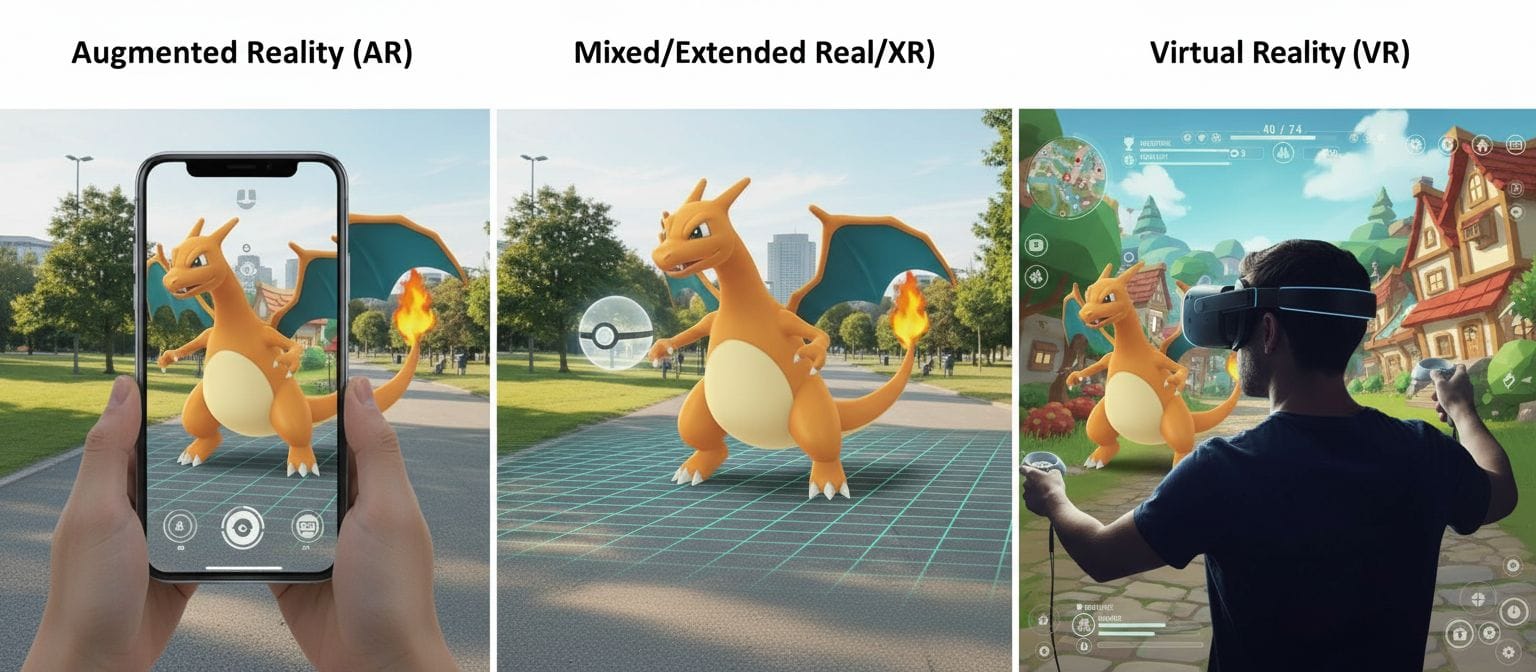
Virtual Reality (VR) - Full immersion in a virtual world - The user sees only digital content - Ideal for training, collaboration and presentations without distraction - Needs a closed VR headset
Augmented Reality (AR) - Digital content over the real world - The user sees a mix of real and virtual - Ideal for service applications and markerless tracking on site - Uses a smartphone, tablet or AR glasses
Mixed Reality (MR) - Anchors virtual objects in the real environment - Interaction between real and virtual - Ideal for design reviews at the real installation site - Uses AR glasses with spatial understanding
Modern platforms combine all three approaches to give the best form of presentation for each use case.
Challenges and Limitations
Hardware costs
Professional VR systems with sufficient image quality for technical details are expensive. Enterprise headsets cost 1,000-5,000 euros per workstation.
Motion sickness
A mismatch between visual perception and physical movement can cause nausea. Modern systems minimize this with high refresh rates and accurate tracking.
Complexity of content creation
VR content needs optimized 3D models with a reduced polygon count for smooth performance. You must prepare the CAD data.
User acceptance
Some people find VR headsets uncomfortable or do not want to use them for hygiene reasons. Modern lightweight headsets and washable pads improve acceptance.
Technical barriers
Network latency in cloud rendering can disturb the immersion. Multi-user sessions need synchronized data transfer.
Frequently Asked Questions (FAQ)
What is the difference between VR and 3D visualization on a screen?
VR gives spatial vision through stereoscopic display and head tracking. Users can move around objects and look at them from all angles. 3D on a screen shows only one perspective without spatial depth. VR also enables a natural perception of size: a machine appears in its real dimensions. This makes decisions about space requirements and accessibility easier.
Which VR hardware is suitable for professional applications?
For B2B applications, systems with at least 2K resolution per eye and a 90 Hz refresh rate are recommended. Meta Quest Pro or HTC Vive XR Elite give a good balance between mobility and quality. For the highest image quality in stationary applications, PC-based systems such as Varjo XR-3 are suitable. Hygiene is also important: replaceable face pads for use by several people.
Can you use VR with existing CAD data?
Yes, you can convert CAD models from common systems (SOLIDWORKS, CATIA, Siemens NX) for VR. The process includes polygon reduction for performance, texture optimization and LOD (level of detail) generation. Modern conversion pipelines automate most of this process. Important: after conversion, the models work not only in VR, but also in web viewers, AR apps and kiosk systems.
How many people can work together in VR at the same time?
Multi-user VR sessions usually support 4-20 simultaneous users. This depends on the platform and the complexity of the scene. For larger meetings, you can use hybrid formats: some participants in VR, others on a video call on a screen. This enables flexible participation, and not everyone needs VR hardware.
Is VR training more effective than traditional training?
Studies show 75% higher knowledge retention with VR training compared to classic classroom teaching. Practical exercises in a safe environment make learning curves faster. VR training is especially effective for critical tasks that people do rarely (emergency procedures, maintenance for rare faults) and cannot practice regularly in reality.
Industry Standards and Technologies
OpenXR standard A cross-platform standard of the Khronos Group for VR/AR applications. You develop once and deploy on different headsets. Source: https://www.khronos.org/openxr/
WebXR Device API A W3C standard for browser-based VR/AR experiences without app installation. It enables cross-platform VR access. Source: https://www.w3.org/TR/webxr/
Unity and Unreal Engine Leading development environments for VR applications. They give integrated VR support, physics simulation and cross-platform deployment.
glTF 2.0 format A Khronos standard for 3D assets on the web and in VR. Efficient transfer and display of complex scenes. Source: https://www.khronos.org/gltf/
Related Topics
Immersive technologies: - Augmented Reality (AR) – overlay of digital content on the real world - Mixed Reality (MR) – anchored virtual objects in the real environment - Extended Reality (XR) – umbrella term for VR, AR and MR - Spatial computing – spatial data processing and interaction
VR technologies: - Head-mounted displays (HMD) – VR headsets and hardware - 6DoF tracking – motion capture with six degrees of freedom - Inside-out tracking – camera-based tracking without external sensors - Haptic feedback – tactile feedback in VR - Spatial audio – three-dimensional sound for immersion
Application areas: - 3D model – digital 3D representation for VR - Virtual collaboration – working together and meeting in virtual rooms - VR training – training and further education in VR - Product visualization – product presentation in virtual environments - Digital twin – virtual copies of real machines
Related AR technologies: - Markerless tracking – AR without physical markers - Marker tracking – AR with reference points - SLAM – simultaneous localization and mapping - visionOS – Apple's spatial computing platform


